




How to Transcribe and Index Audio Content for a Private AI Chatbot (Whisper + ChromaDB)
Every education platform, legal firm, and corporate training team has the same untapped asset: hours of recorded audio and video content locked in files that no AI can search. This guide walks through the exact pipeline we built for the Cosmo Guru Institute chatbot, demonstrating how audio transcription for private AI chatbot systems can convert hundreds of hours of Vedic astrology lectures into a searchable, queryable private knowledge base.
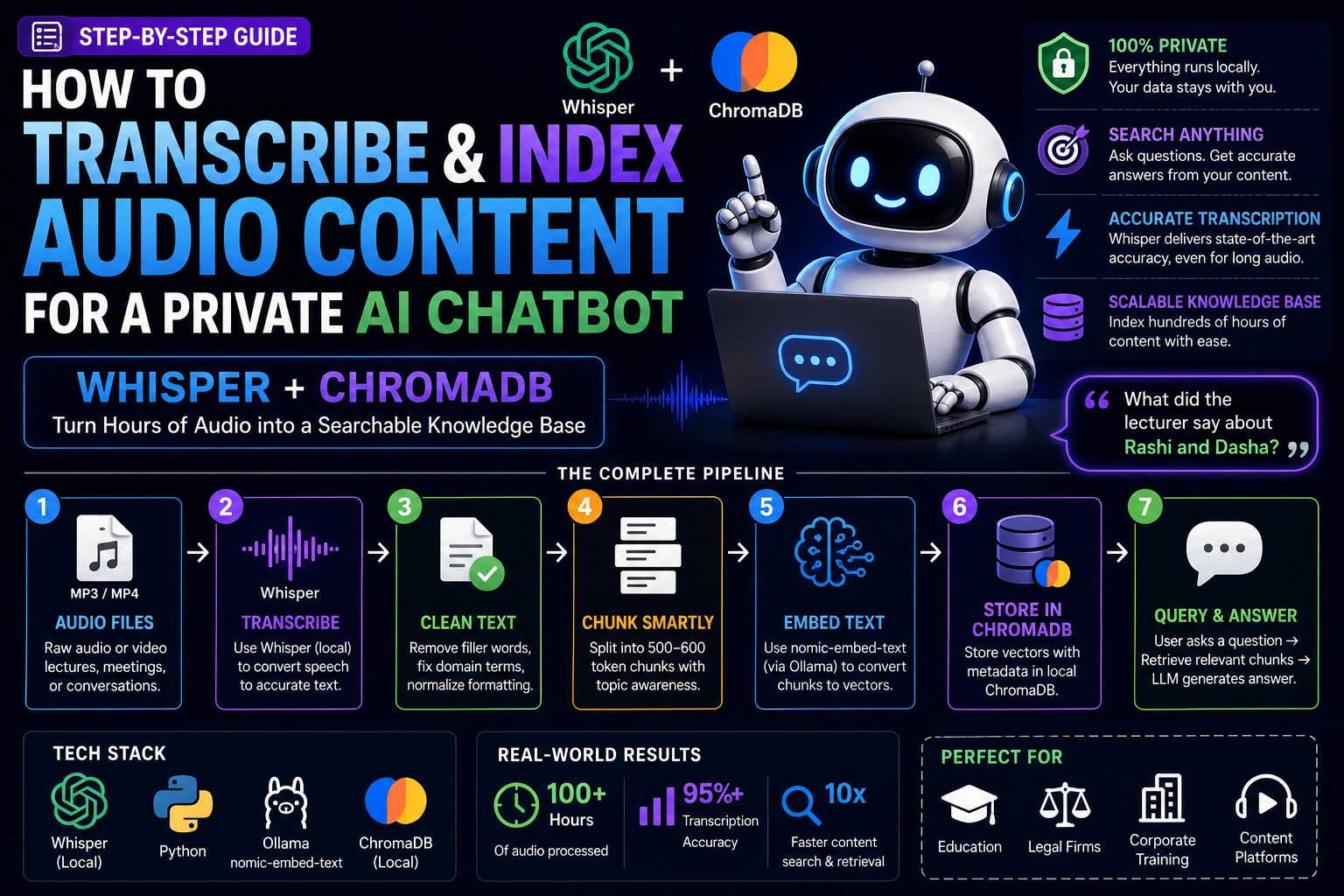
The Pipeline Overview
Audio Files (MP3/MP4)
      │
      ▼
Whisper (local transcription)
      │
      ▼
Text Cleaning Pipeline
(filler words, domain corrections, normalization)
      │
      ▼
Intelligent Chunking
(topic-aware, 500-600 tokens per chunk)
      │
      ▼
nomic-embed-text (via Ollama)
(converts chunks to vectors)
      │
      ▼
ChromaDB Persistent Store
      │
      ▼
Query → Retrieve → LLM → Answer
Step 1 — Whisper Transcription (Run Locally)
import whisper
from pathlib import Path

def transcribe_directory(audio_dir: str, output_dir: str, model_size: str = "large-v2"):
    model = whisper.load_model(model_size)

    Path(output_dir).mkdir(exist_ok=True)

    audio_extensions = [".mp3", ".mp4", ".wav", ".m4a", ".ogg"]
    audio_files = [
        f for f in Path(audio_dir).iterdir()
        if f.suffix.lower() in audio_extensions
    ]

    print(f"Found {len(audio_files)} audio files")

    for i, audio_file in enumerate(audio_files):
        output_file = Path(output_dir) / f"{audio_file.stem}.txt"

        if output_file.exists():
            print(f"[{i+1}/{len(audio_files)}] Skipping {audio_file.name} (already done)")
            continue

        print(f"[{i+1}/{len(audio_files)}] Transcribing {audio_file.name}...")

        result = model.transcribe(
            str(audio_file),
            language="en",
            verbose=False,
            # Domain hint improves accuracy for specialized content
            initial_prompt="This is a lecture about Vedic astrology. Terms include: Rashi, Nakshatra, Bhava, Dasha, Yoga, Lagna, Graha, Shani, Mangal, Rahu, Ketu."
        )

        with open(output_file, "w", encoding="utf-8") as f:
            f.write(result["text"])

        word_count = len(result["text"].split())
        print(f"  Transcribed {word_count:,} words")

# Usage
transcribe_directory("./audio_lectures", "./transcripts")
Model selection:
tiny/base: Fast, less accurate. Good for testing.medium: Good balance. 3x faster than large.large-v2: Best accuracy, especially for accented speech and domain terminology. Use for production.
Step 2 — Text Cleaning
import re

DOMAIN_CORRECTIONS = {
    # Common Whisper errors for Vedic astrology terms
    "rash ": "Rashi ",
    "rashes": "Rashi",
    "natasha": "Nakshatra",
    "bava": "Bhava",
    "log na": "Lagna",
    # Add your domain's commonly misrecognized terms
}

def clean_transcript(text: str) -> str:
    # Apply domain corrections first
    for wrong, correct in DOMAIN_CORRECTIONS.items():
        text = text.replace(wrong, correct)

    # Remove filler words
    filler_pattern = r'\b(um|uh|er|ah|hmm|like|you know|basically|actually|so yeah)\b'
    text = re.sub(filler_pattern, '', text, flags=re.IGNORECASE)

    # Remove repeated words (stuttering artifacts)
    text = re.sub(r'\b(\w+)(\s+\1){1,3}\b', r'\1', text, flags=re.IGNORECASE)

    # Normalize whitespace
    text = re.sub(r'\s+', ' ', text).strip()

    # Split into paragraphs at natural boundaries
    text = re.sub(r'(?<=[.!?])\s+(?=[A-Z])', '

', text)

    return text
Step 3 — Topic-Aware Chunking
Don't just split by character count. Audio transcripts have natural topic transitions — preserve them:
from langchain.text_splitter import RecursiveCharacterTextSplitter

def chunk_transcripts(transcripts_dir: str) -> list[dict]:
    splitter = RecursiveCharacterTextSplitter(
        chunk_size=600,
        chunk_overlap=100,
        separators=["

", "
", ". ", "? ", "! ", ", ", " "]
    )

    all_chunks = []

    for transcript_file in Path(transcripts_dir).glob("*.txt"):
        with open(transcript_file, "r") as f:
            text = f.read()

        clean_text = clean_transcript(text)
        chunks = splitter.split_text(clean_text)

        for i, chunk in enumerate(chunks):
            if len(chunk.strip()) < 80:  # Skip tiny chunks
                continue
            all_chunks.append({
                "text": chunk.strip(),
                "source": transcript_file.name,
                "source_type": "lecture_transcript",
                "chunk_index": i,
                "total_chunks": len(chunks)
            })

    print(f"Total chunks: {len(all_chunks)}")
    print(f"Total tokens (approx): {sum(len(c['text'].split()) for c in all_chunks) * 1.3:.0f}")

    return all_chunks
Step 4 — Embedding and Indexing
import chromadb
from chromadb.utils.embedding_functions import OllamaEmbeddingFunction

def build_knowledge_base(chunks: list[dict], db_path: str):
    client = chromadb.PersistentClient(path=db_path)

    # Use Ollama's nomic-embed-text (free, runs locally)
    embedding_fn = OllamaEmbeddingFunction(
        url="http://localhost:11434/api/embeddings",
        model_name="nomic-embed-text"
    )

    collection = client.get_or_create_collection(
        name="audio_knowledge_base",
        embedding_function=embedding_fn,
        metadata={"hnsw:space": "cosine"}
    )

    # Index in batches of 100
    batch_size = 100
    for i in range(0, len(chunks), batch_size):
        batch = chunks[i:i + batch_size]

        collection.add(
            documents=[c["text"] for c in batch],
            metadatas=[{k: v for k, v in c.items() if k != "text"} for c in batch],
            ids=[f"{c['source']}_{c['chunk_index']}" for c in batch]
        )

        print(f"Indexed {min(i + batch_size, len(chunks))}/{len(chunks)} chunks")

    print(f"Knowledge base built: {collection.count()} chunks indexed")
    return collection
Real Numbers from the Cosmo Guru Build
| Step | Input | Output | Time |
|---|---|---|---|
| Transcription (Whisper large-v2, CPU) | 216 hours audio | 2.1M words | ~3 days |
| Cleaning | 2.1M words | 1.9M words | 15 minutes |
| Chunking | 1.9M words | 4,200 chunks | 2 minutes |
| Embedding (nomic-embed-text, Ollama) | 4,200 chunks | ChromaDB index | 45 minutes |
| Total pipeline | Audio files | Queryable knowledge base | ~3.5 days |
Once built, the knowledge base is permanent. New lectures are added incrementally — running just the new files through the pipeline.
Query the Knowledge Base
def query_knowledge_base(query: str, collection, n_results: int = 5) -> list[str]:
    results = collection.query(
        query_texts=[query],
        n_results=n_results,
        include=["documents", "distances", "metadatas"]
    )

    # Filter by relevance threshold
    relevant = [
        doc for doc, dist in zip(
            results['documents'][0],
            results['distances'][0]
        )
        if dist < 0.4  # Cosine distance — lower is more relevant
    ]

    return relevant

# Usage
context = query_knowledge_base(
    "What is the significance of Rahu in the 7th house?",
    collection
)
We're Monk Media One Tech — AI automation agency, Ahmedabad. We build private LLM systems and RAG pipelines for education, professional services, and enterprise clients.
Book a free discovery call: monkmediaone.tech/contact
📞 +91 88668 19349 | hello@monkmediaone.tech