


LangChain vs LangGraph: When to Use Each (With Real Code Examples)
A developer's guide to choosing between LangChain's chain/agent approach and LangGraph's stateful graph model — based on real production use cases.
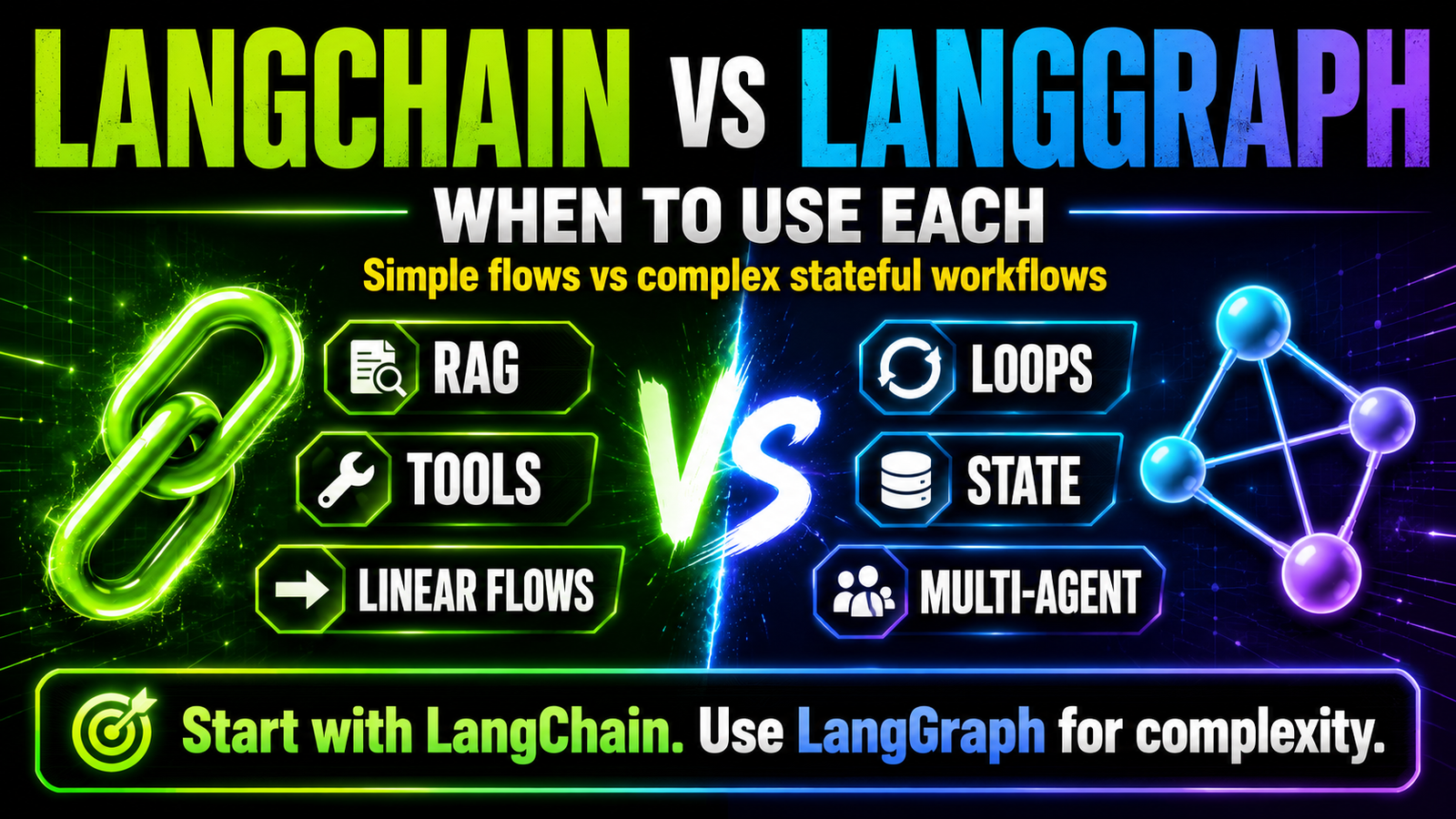
LangGraph is built on top of LangChain. They're not competitors — they're different tools for different complexity levels. Knowing when to use which one will save you weeks of unnecessary engineering.
The Core Distinction
LangChain is a toolkit for building LLM-powered pipelines. Chains, prompts, memory, tools, retrievers — it's a collection of components you assemble. Best for linear or moderately complex flows.
LangGraph is a framework for building stateful, graph-based AI workflows. You define nodes (processing steps) and edges (transitions). State is explicit and shared across all nodes. Best for workflows with loops, conditional branching, human checkpoints, or anything that needs to be resumable.
Think of it this way: LangChain builds a pipeline. LangGraph builds a state machine.
When LangChain Is Enough
Use Case 1: Simple RAG Chain
from langchain_openai import ChatOpenAI, OpenAIEmbeddings
from langchain_community.vectorstores import Chroma
from langchain.chains import RetrievalQA
from langchain_core.prompts import PromptTemplate

# Load your knowledge base
embeddings = OpenAIEmbeddings(model="text-embedding-3-small")
vectorstore = Chroma(
    persist_directory="./knowledge_base",
    embedding_function=embeddings
)
retriever = vectorstore.as_retriever(search_kwargs={"k": 5})

# Define prompt
prompt = PromptTemplate(
    template="""You are a helpful customer support agent.

Context from knowledge base:
{context}

Customer question: {question}

Answer based only on the context above. If the answer isn't there, say so.""",
        input_variables=["context", "question"]
)

# Build chain
llm = ChatOpenAI(model="gpt-4o-mini", temperature=0)
qa_chain = RetrievalQA.from_chain_type(
    llm=llm,
    chain_type="stuff",
    retriever=retriever,
    chain_type_kwargs={"prompt": prompt}
)

# Use it
answer = qa_chain.invoke({"query": "What is your return policy for damaged items?"})
print(answer["result"])
This is clean, readable, and sufficient for 80% of chatbot use cases. Don't reach for LangGraph when this works.
Use Case 2: Simple Agent with Tools
from langchain_openai import ChatOpenAI
from langchain.agents import create_openai_tools_agent, AgentExecutor
from langchain_core.tools import tool
from langchain_core.prompts import ChatPromptTemplate, MessagesPlaceholder

@tool
def check_order_status(order_id: str) -> str:
    """Check the status of a customer order."""
    # Your database lookup logic
    return f"Order {order_id}: Shipped on 2025-05-15, expected delivery 2025-05-18"

@tool
def initiate_refund(order_id: str, reason: str) -> str:
    """Initiate a refund for an order."""
    # Your refund logic
    return f"Refund initiated for order {order_id}. Reference: REF-{order_id}-001"

llm = ChatOpenAI(model="gpt-4o-mini", temperature=0)

prompt = ChatPromptTemplate.from_messages([
    ("system", "You are a customer service agent. Be concise and helpful."),
    MessagesPlaceholder("chat_history"),
    ("human", "{input}"),
    MessagesPlaceholder("agent_scratchpad"),
])

agent = create_openai_tools_agent(llm, [check_order_status, initiate_refund], prompt)
executor = AgentExecutor(agent=agent, tools=[check_order_status, initiate_refund], verbose=False)

response = executor.invoke({
    "input": "I want to return order ORD-12345, it was damaged",
    "chat_history": []
})
print(response["output"])
For a customer service bot that needs to check orders and process refunds — LangChain is entirely sufficient. No need for LangGraph.
When You Need LangGraph
Use Case 1: Iterative Content Refinement
Content workflows that need to loop — write, review, revise, re-review — are where LangGraph shines.
from langgraph.graph import StateGraph, END
from langchain_openai import ChatOpenAI
from typing import TypedDict

class ContentState(TypedDict):
    brief: str
    draft: str
    feedback: str
    revision_count: int
    approved: bool
    final_content: str

llm = ChatOpenAI(model="gpt-4o-mini", temperature=0.4)

def write_node(state: ContentState) -> ContentState:
    """Write or rewrite based on feedback"""
    if state.get("feedback"):
        prompt = f"Rewrite this draft addressing this feedback:

Feedback: {state['feedback']}

Original draft:
{state['draft']}"
    else:
        prompt = f"Write a 500-word blog intro for this brief:
{state['brief']}"

    response = llm.invoke(prompt)
    return {
        "draft": response.content,
        "revision_count": state.get("revision_count", 0) + 1
    }

def review_node(state: ContentState) -> ContentState:
    """Review the draft and decide if it's good enough"""
    review_prompt = f"""Review this blog intro. Score 1-10 and return JSON only:
{{\"score\": int, \"approved\": bool, \"feedback\": \"specific issues if not approved\"}}

Draft:
{state['draft']}"""

    import json
    response = llm.invoke(review_prompt)
    result = json.loads(response.content.strip())

    return {
        "approved": result["approved"],
        "feedback": result.get("feedback", ""),
        "final_content": state["draft"] if result["approved"] else ""
    }

def routing(state: ContentState) -> str:
    """Route: approved \\u2192 end, max revisions \\u2192 end, otherwise \\u2192 rewrite"""
    if state.get("approved"):
        return END
    if state.get("revision_count", 0) >= 3:
        return END  # Stop after 3 revisions regardless
    return "write"

workflow = StateGraph(ContentState)
workflow.add_node("write", write_node)
workflow.add_node("review", review_node)
workflow.set_entry_point("write")
workflow.add_edge("write", "review")
workflow.add_conditional_edges("review", routing, {"write": "write", END: END})

app = workflow.compile()
result = app.invoke({"brief": "Blog intro about AI automation for Indian SMBs"})
print(result["final_content"] or result["draft"])
LangChain can't do this elegantly. You'd have to build the loop logic manually.
Use Case 2: Human-in-the-Loop Approval
from langgraph.graph import StateGraph, END
from langgraph.checkpoint.memory import MemorySaver

# Interrupt before sending an email for human review
workflow = StateGraph(EmailState)
workflow.add_node("draft_email", draft_email_node)
workflow.add_node("send_email", send_email_node)
workflow.set_entry_point("draft_email")
workflow.add_edge("draft_email", "send_email")

# Compile with interrupt BEFORE send_email
memory = MemorySaver()
app = workflow.compile(
    checkpointer=memory,
    interrupt_before=["send_email"]  # Pause here for human approval
)

config = {"configurable": {"thread_id": "email-001"}}

# Run until the interrupt
result = app.invoke({"recipient": "client@company.com", "subject": "Proposal"}, config)
print("Draft for review:", result["email_draft"])

# Human reviews and approves...
# Then resume the workflow
final = app.invoke(None, config)  # Resume from checkpoint
This is impossible to do cleanly in plain LangChain. Human-in-the-loop is a first-class LangGraph feature.
Use Case 3: Multi-Agent Orchestration
from langgraph.graph import StateGraph, END
from typing import TypedDict, Annotated
import operator

class AgentState(TypedDict):
    task: str
    research: str
    analysis: str
    final_report: str
    messages: Annotated[list, operator.add]

# Each agent is a node
def research_agent(state): ...
def analysis_agent(state): ...
def report_agent(state): ...

workflow = StateGraph(AgentState)
workflow.add_node("research", research_agent)
workflow.add_node("analysis", analysis_agent)
workflow.add_node("report", report_agent)

workflow.set_entry_point("research")
workflow.add_edge("research", "analysis")
workflow.add_edge("analysis", "report")
workflow.add_edge("report", END)

app = workflow.compile()
Decision Cheat Sheet
| If your workflow needs... | Use |
|---|---|
| Simple Q&A or chatbot | LangChain |
| Agent with 2-5 tools | LangChain AgentExecutor |
| RAG pipeline | LangChain |
| Loop until condition met | LangGraph |
| Human approval step mid-workflow | LangGraph |
| Resume after crash | LangGraph |
| Multiple agents collaborating | LangGraph |
| Complex conditional branching | LangGraph |
| Parallel agent execution | LangGraph |
| Visual debugging of flow | LangGraph |
The practical rule: If you're writing while not done: anywhere in your LangChain code — switch to LangGraph.
We're Monk Media One Tech — AI automation agency, Ahmedabad. We build LangChain RAG systems and LangGraph multi-agent workflows for production.
Book a free discovery call: monkmediaone.tech/contact
📞 +91 88668 19349 | hello@monkmediaone.tech