
What Is a RAG Pipeline? A Plain-English Explanation for Business Owners
You've probably heard that ChatGPT "doesn't know about recent events" or "can't access your company data." Both are true — and both are solved by something called a RAG pipeline.
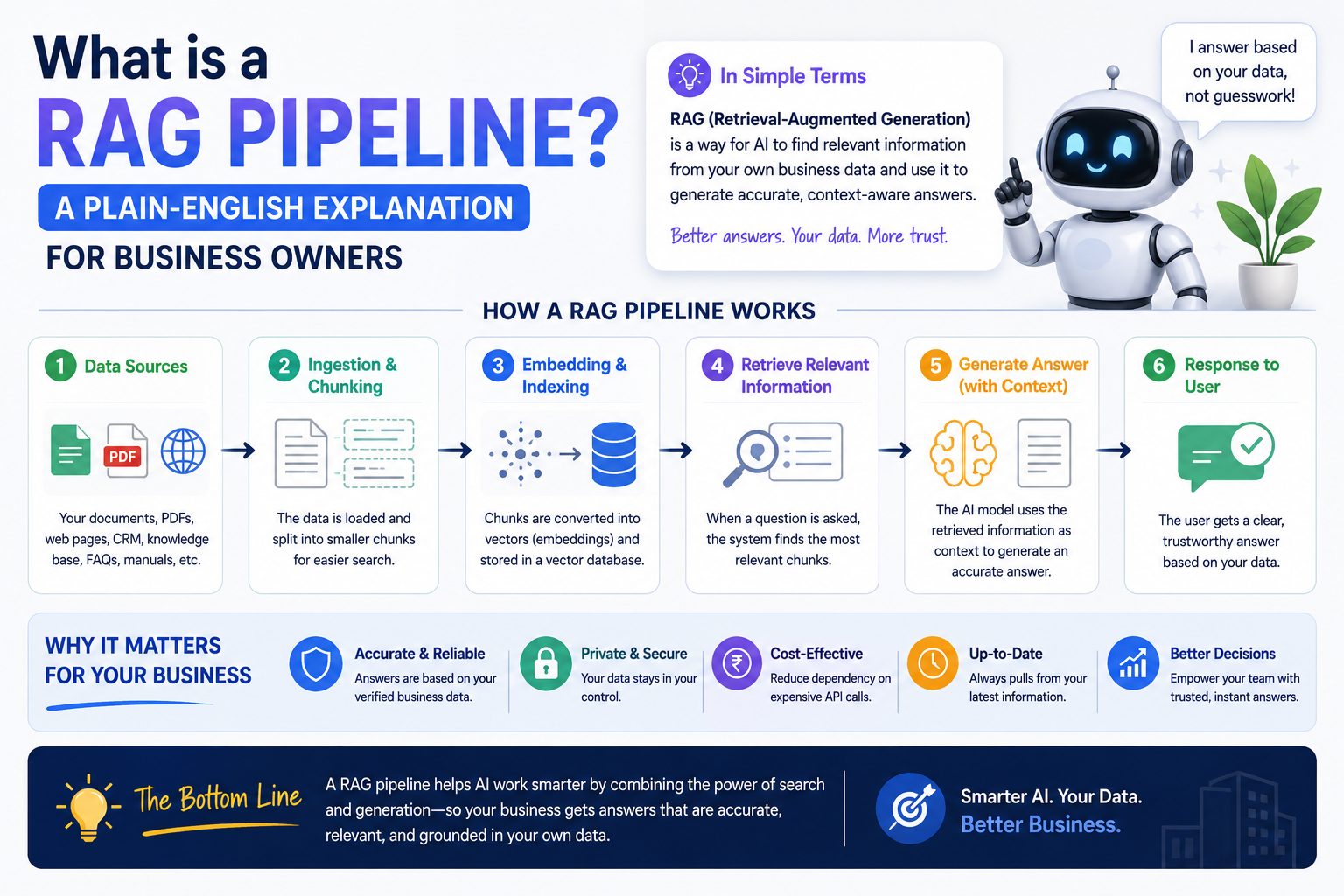
RAG stands for Retrieval-Augmented Generation. It's the technology behind every useful business AI chatbot you've seen — the ones that actually know about your products, your policies, your history. Not the generic ones that hallucinate answers.
This article explains exactly what RAG is, how it works, and what it means for your business — in plain English, with real examples.
The Problem RAG Solves
Imagine hiring a brilliant new employee. They have a PhD, speak 50 languages, and can write, code, and analyze data. But they've never heard of your company. They don't know your products, your pricing, your customers, or your policies.
That's ChatGPT (or any base LLM) without RAG.
Now imagine that same employee — but before they start, you give them a complete library of every document your company has ever produced. Every policy manual, every product spec, every customer FAQ, every email template. And whenever a customer asks them a question, they can instantly search that library and answer accurately.
That's RAG.
How RAG Actually Works (The Simple Version)
There are three steps:
Step 1: Store your knowledge
You take all your company documents — PDFs, Word files, website content, spreadsheets, email archives — and break them into small chunks of text. Each chunk gets converted into a list of numbers (called an embedding or vector) that represents its meaning. These vectors get stored in a special database called a vector store.
Step 2: Search your knowledge
When a user asks a question, their question also gets converted into a vector. The system then searches the vector store to find the chunks of text that are semantically closest to the question — not just keyword matches, but meaning matches.
Step 3: Generate the answer
The retrieved chunks are sent to the LLM (ChatGPT, Claude, Gemini, or a local model) along with the user's question. The LLM reads the relevant context and generates an accurate, grounded answer based on your actual documents.
A Real Example: Banking Chatbot
One of our clients is a cooperative bank in Gujarat. Their support team was handling 300+ calls per day — customers asking about loan eligibility, interest rates, account opening requirements, and fixed deposit policies.
All of this information existed in their documents. But customers couldn't find it, and support staff spent 80% of their time answering the same 50 questions.
We built a RAG-powered chatbot:
- Ingested 47 policy documents, 3 years of FAQ archives, and their product brochures
- Stored everything in ChromaDB (a vector database)
- Connected the retrieval system to a local Mistral LLM
- Deployed it on their website and WhatsApp
Now when a customer asks "What documents do I need to open a current account?", the chatbot:
- Converts the question to a vector
- Finds the 3-4 most relevant chunks from the policy documents
- Passes those chunks to the LLM
- Returns a precise, accurate answer in seconds
No hallucination. No making up interest rates. No wrong information — because the LLM can only answer based on what it retrieved from the actual bank documents.
Support call volume dropped by 60% in the first month.
What Makes RAG Different from Fine-Tuning?
You might have heard of "fine-tuning" as a way to teach an AI about your business. RAG and fine-tuning are different approaches, and they're often confused.
Fine-tuning is like training an employee by having them memorize your company handbook. The knowledge gets baked into the model itself. It's expensive, time-consuming, and you need to retrain every time your documents change.
RAG is like giving an employee a searchable library they can reference at any time. No retraining needed. When your policies change, you just update the documents in the vector store. The LLM automatically uses the new information.
For 90% of business use cases, RAG is the right choice:
- Faster to build (days vs weeks/months for fine-tuning)
- Cheaper (no GPU training costs)
- Easier to update (change a document, not retrain a model)
- More transparent (you can see exactly which source it retrieved from)
Business Use Cases Where RAG Delivers Immediate ROI
- Customer support chatbots — Train on your FAQ, return policy, product manual. Answer 70% of support tickets automatically.
- Internal knowledge bases — "What's our leave policy?" "How do I submit an expense?" HR chatbots that know your actual policies.
- Sales assistants — "What's the difference between plan A and plan B?" "Do we support XYZ integration?" Product knowledge bots that sales reps can query mid-call.
- Legal document search — Law firms searching across thousands of case files and precedents. Find the relevant clause in seconds instead of hours.
- Medical/clinical reference — Hospitals training bots on treatment protocols, drug interactions, and clinical guidelines for doctor reference.
- Training and onboarding — New employee asks a question, bot retrieves the relevant SOP or training document and explains it.
The Technical Components (If You're Curious)
A RAG pipeline has five components:
- Document ingestion — Loading your files (PDF, Word, CSV, URLs, etc.)
- Chunking — Splitting documents into ~500-word pieces
- Embedding model — Converting text chunks to vectors (OpenAI
text-embedding-3-small, or free options likenomic-embed-text) - Vector database — Storing and searching vectors (ChromaDB, Pinecone, Qdrant, Weaviate)
- LLM — Generating the final answer (GPT-4o, Claude, Gemini, or a local model via Ollama)
The quality of your RAG system depends most on two things: the quality of your source documents and the quality of your chunking strategy. A well-structured document library with good chunking will outperform a messy one even with the same LLM.
What RAG Cannot Do
RAG is powerful but not magic. It cannot:
- Answer questions about information that isn't in your documents
- Reason over live data unless you connect it to real-time sources
- Replace a human for complex judgment calls or novel situations
- Guarantee zero hallucinations (though it dramatically reduces them vs a base LLM)
The "hallucination guardrail" we always add: instruct the LLM explicitly to say "I don't have that information in the knowledge base" when retrieval returns nothing relevant. This simple instruction prevents most false answers.
How Much Does It Cost to Build a RAG System?
For a typical business knowledge base:
| Component | Monthly Cost |
|---|---|
| OpenAI embeddings (one-time ingestion of 1,000 docs) | ~$5 one-time |
| ChromaDB (self-hosted) | ₹0 |
| Ollama + Mistral 7B (self-hosted) | ₹0 (VPS cost) |
| VPS to host everything | ₹800–2,000/month |
| Total ongoing | ₹800–2,000/month |
If you use OpenAI or Anthropic for the LLM (instead of local): add ₹2,000–8,000/month depending on query volume.
For a business currently paying ₹30,000/month in support staff costs that could be reduced by 60%, a RAG chatbot pays for itself in week one.
Getting Started
If you have more than 50 documents that your team regularly searches through, or you're paying humans to answer repetitive questions, a RAG system will almost certainly deliver positive ROI.
At Monk Media One Tech, we typically deliver a working RAG chatbot in 10–15 working days for most business knowledge bases. We handle ingestion, vector store setup, LLM integration, and frontend deployment.
We're Monk Media One Tech — AI automation agency, Ahmedabad, India. We build RAG systems, private LLM deployments, and AI chatbots for businesses across India and Canada.
Book a free discovery call: monkmediaone.tech/contact
📞 +91 88668 19349 | hello@monkmediaone.tech